
Theme colour
Your school’s colour, throughout SMS.
Your school’s colour across all of SMS, from buttons and menus to the sign-in screen.
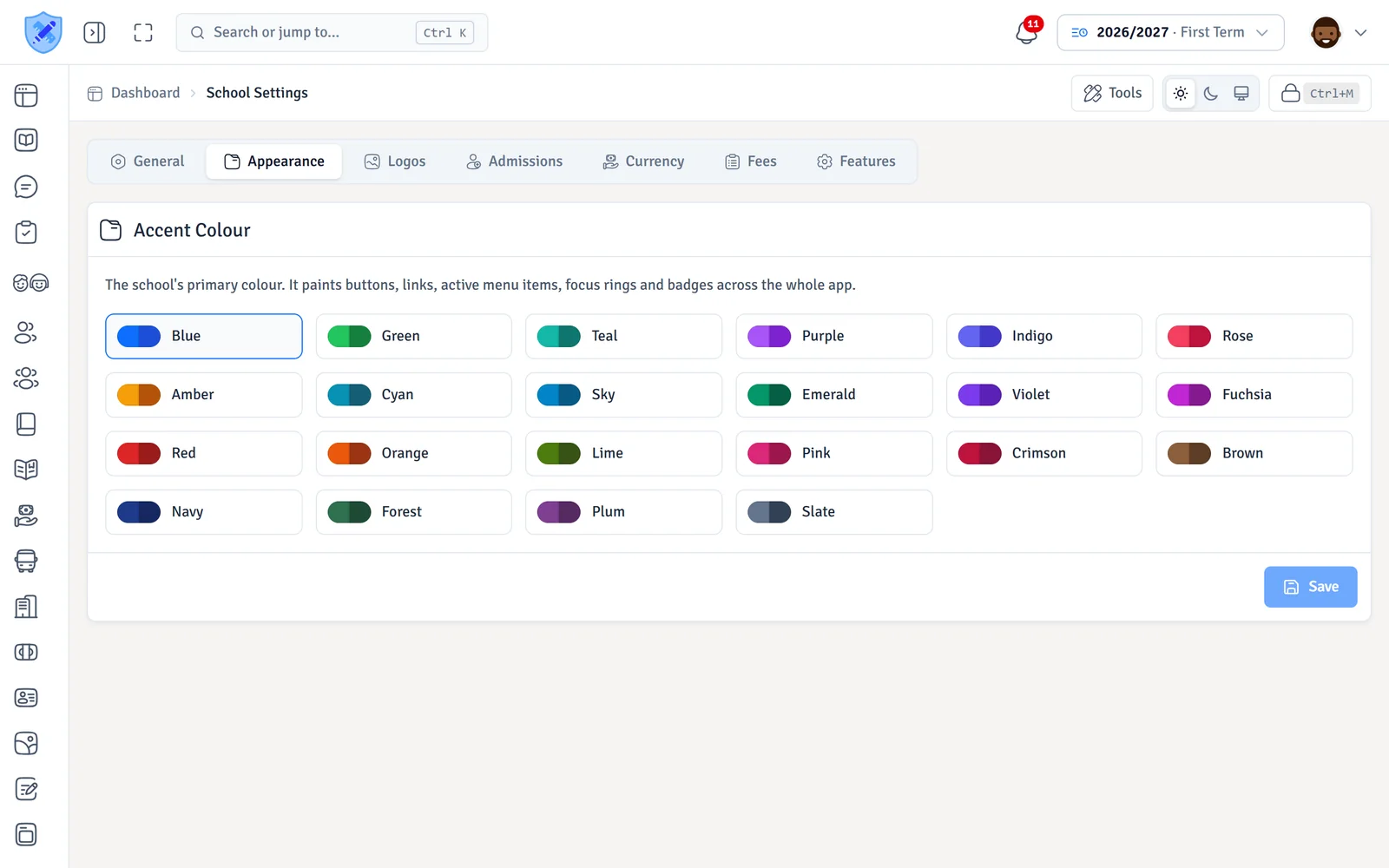
22 palettes
Colours chosen to stay readable.
22 colours, each tuned so text stays readable.
Try before you save
See it before anyone else does.
See it on real buttons and menus before you save.
Per branch
Set once, seen at sign-in.
Each branch keeps its own colour, right through to the sign-in screen.
Part of one system
How Theme colour works with the rest of SMS
The school sets its colour once; each person still chooses light or dark.
- School setup
Receives: The colour chosen during first-run setup.
- School branches
Sends: A colour for each branch, also used on its sign-in screen.
- Personal preferences
Sends: The school colour, shown in each person’s own choice of light or dark mode.
- Printables
Sends: One part of your school’s look, alongside its document and email designs.
Staff who are allowed to edit School settings. Everyone in the branch then sees the new colour.
No. You choose from the 22 palettes, which keeps every shade readable.
Give Academium SMS your school’s colour.
Download Academium SMS and set up your school, try a demo, or start in free mode.